
Live product walkthrough
Experience MyCaly In Action.
MyCaly helps you turn availability into booked, paid and confirmed meetings. This demo shows the full flow: availability rules, the client booking page, Stripe payments, the HD video room and two-way calendar sync. Watch the tour, or request a 1-on-1 guided demo with our product team.
Explore our unified scheduling rules, frictionless client booking flow, integrated Stripe payment collection, HD WebRTC video, and calendar sync engines.
- No credit card required
- 2-minute setup
- 2-way calendar sync

See MyCaly in action, live
These are real MyCaly pages running right now. Open them, pick a time slot or register for the webinar, and see exactly what your clients will experience.

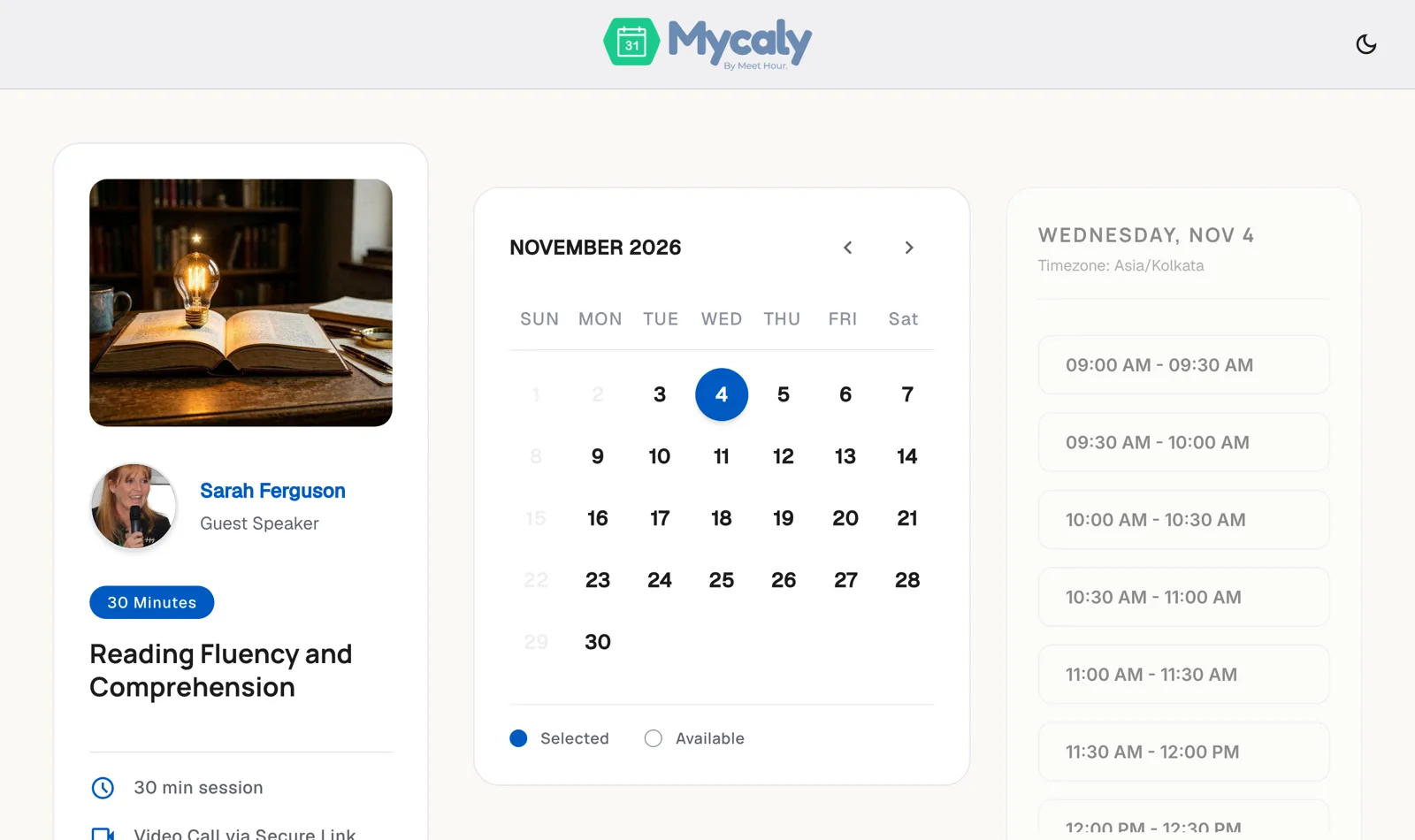
A booking page clients finish in seconds
Clients see your real-time availability, choose a date and time in their own time zone, add their details, pay if needed and instantly get a secure video meeting link.
- Live calendar with open time slots
- Booking summary with upfront payment
- Secure video call link for every booking

A webinar page that fills your seats
Publish a branded event page with the date, agenda, speakers and one-click registration, then host the session in an HD Meet Hour room.
- Date, time and time zone at a glance
- Agenda, key takeaways and speaker profiles
- One-click registration on any device
Product tour
What can you explore in the MyCaly demo?
Five steps, from the rules that protect your calendar to the meeting itself.
Intelligent Availability & Multi-Calendar Engine
Automated buffer protection, daily call caps, and 2-way conflict prevention.

Guest Booking Interface
Lightning-fast 28-second client reservations with auto timezone detection.
Stripe & PCI-DSS Checkout Settlement
Instant deposits, full fee payments, and automatic tax invoicing.

Built-in 1080p WebRTC Video Studio
Zero app installations required. Screen sharing, active speaker spotlight, and AI recaps.

Two-Way Enterprise Calendar Synchronization
Seamless real-time synchronization across Google Calendar, Outlook 365, and iCloud.

Watch the demo
From booking to a live Meet Hour video room
See what happens after a client books: the confirmed appointment opens straight into a browser-based HD video meeting, with no app to install.
- 1080p HD video in the browser
- Screen sharing and active speaker spotlight
- Meeting link sent with every confirmation
What your clients see
Client Booking Page Simulator
A preview of the booking page your clients use: pick a time, add their details, and get a confirmed meeting with the video link.
 HostAlex Morgan
30-minute consultation
Select Time for Thursday, Nov 5 (EST):
- Your Name
- Jordan Taylor
- Your Email
- jordan@example.com
- Please share what you'd like to cover:
- Looking forward to discussing the project scope!
A calendar invitation with the HD Video Room link has been emailed to the guest.
- Event:
- 30-minute consultation
- When:
- Thursday, Nov 5 · 02:00 PM EST
- Host:
- Alex Morgan
- Location:
- MyCaly 1080p HD Video
Preview only. Create a free account to publish your own booking page.
Create your booking pageLive Product Walkthrough
Experience MyCaly in Action
Pick a convenient time below. Our product team will give you a personalized tour tailored to your team's scheduling workflow.
-
Meeting Format1-on-1 HD Video
-
HostMyCaly Product Specialist
Select Date
Select Time (EST)
What we'll ask you
Send us your preferred date, time and team size through the contact form, and we will confirm your session with a calendar invitation and Meet Hour video link.
Prefer to explore on your own? Start Free Trial
Frequently Asked Questions
What does the MyCaly demo cover?
The demo walks through five parts of MyCaly: the availability engine with buffers, daily caps and conflict prevention; the guest booking interface; Stripe payment collection; the built-in 1080p HD video room; and two-way sync with Google Calendar, Outlook 365 and iCloud.
How do I book a 1-on-1 guided demo?
Choose a preferred date and time, then send your request through the contact form with your name, work email and team size. Our product team confirms the session and sends a calendar invitation with a Meet Hour HD video link.
Who runs the guided demo?
A MyCaly product specialist hosts a 1-on-1 HD video session and tailors the tour to your team's scheduling workflow, whether you are a solo professional or an enterprise team.
Do my clients need to install anything to join a meeting?
No. MyCaly meetings run in a browser-based HD video room powered by Meet Hour, so there are zero app installations. Screen sharing and active speaker spotlight are built in.
Can I try MyCaly without a demo?
Yes. You can start a free account at any time, connect your calendars, set your availability and publish a booking page in minutes. No credit card is required.
Your Schedule Shouldn't Slow You Down.
Start scheduling smarter with MyCaly. Connect your calendars, set your pricing rules, and start accepting client bookings today.
- Smart Scheduling
- Direct Payments
- HD Video Meetings